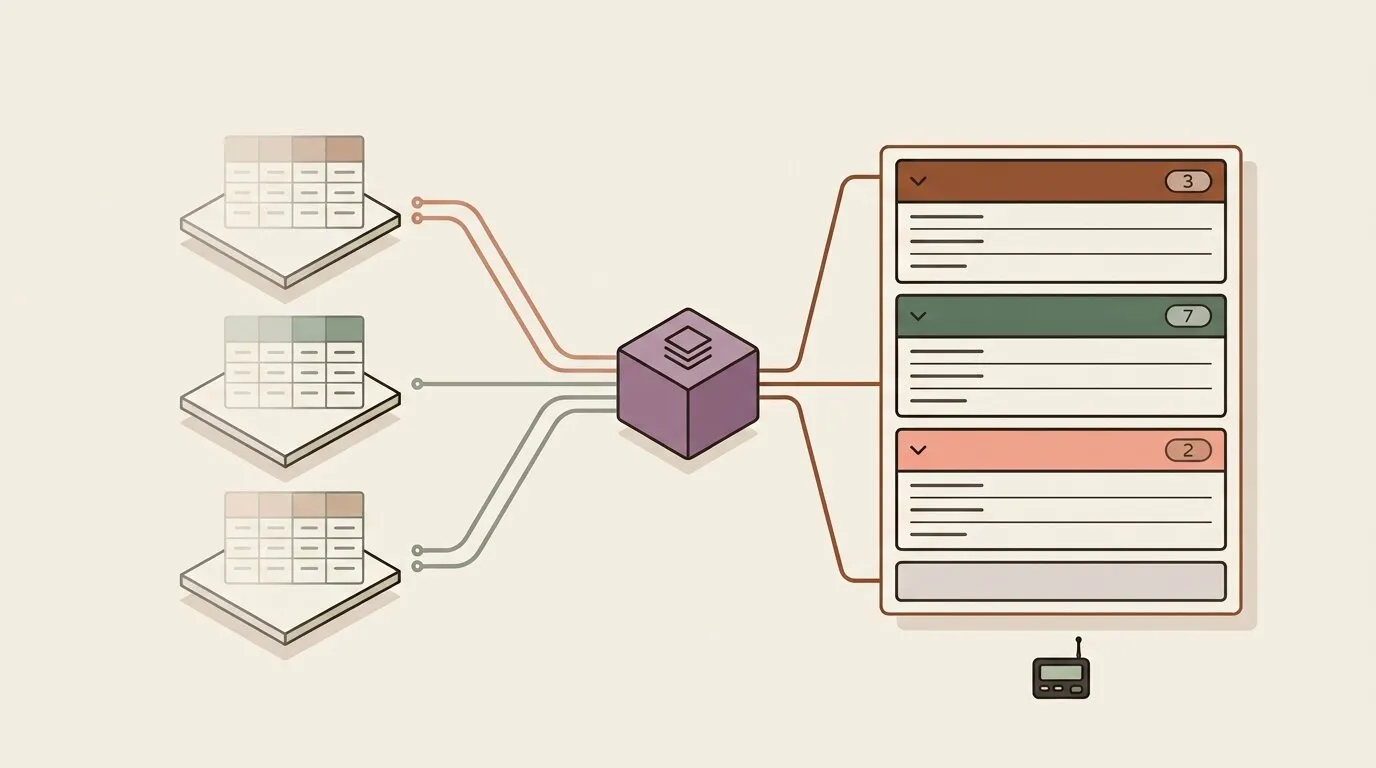
Our own content calendar runs in an Omnismith workspace. Every content item carries a platform field — Website Blog, Telegram, LinkedIn — and for months the editorial workspace held three identical panes, each filtered to a single platform. It worked, and it was a workaround: three panes to keep in sync every time a column changed, and a fourth one waiting for the day a new channel arrives. Systems of record have a standard answer to this shape of problem — group by — and a workspace pane now has it.
One pane, one section per value
Open the pane menu, choose Group by → Platform, and the pane splits its records into collapsible sections, one per value:
- Sections follow the order you defined. A list field lays its sections out in list order, so a status field reads Draft → In review → Published, the way the workflow runs. Other fields sort by label, and a No value section collects the records that have none, always last.
- Every header carries a live count. The count and the rows below it come from the same query criteria, so they always agree.
- Each section pages on its own. A group with three hundred records gets its own pager; the three-record group next to it stays on screen.
- Sections load as they scroll into view. A pane with forty groups only fetches the ones someone actually looks at.
- Search, filters, and sort apply to every section at once. Typing in the search box narrows the counts and the records together; a section with no matches drops out.
- Tables and cards both work, and bulk selection spans sections, so actions can run on records picked from several groups.
- The grouping is saved with the view. Every teammate who opens the workspace sees the same sections, and switching a saved view in or out of a pane carries its grouping along.
What can key a group
Lists, references, text, numbers, booleans, dates, and datetimes. Group a deal pipeline by owner (a reference to a person), a ticket queue by priority, an asset register by warehouse, a content calendar by platform. The menu offers only fields that can key a group: metrics are time series, and markdown, file, and image fields carry no groupable value.
Grouping pairs with keyword search. Semantic search returns a relevance-ranked shortlist, which has no stable per-group counts, so the semantic toggle stays locked while a pane is grouped and tells you why.
The same thing over the API
A grouped view is two calls, and both are available to your own scripts and to AI agents connected through the MCP server.
First, count the groups. The aggregate endpoint gained two options for this: order: "key" lays groups out by their key (list order, then label, no-value group last), and global_search applies the same text match as the search box, so counts agree with search totals.
curl -X POST "https://api.omnismith.io/v1/entities/aggregate/content_item" \
  -H "Authorization: Bearer omni_live_secret_key_..." \
  -H "X-Omnismith-Project-Id: $PROJECT_ID" \
  -H "Content-Type: application/json" \
  -d '{
    "group_by": ["platform"],
    "aggregations": [{ "op": "count" }],
    "order": "key"
  }'
{
"data": [
{ "key": [{ "field": "platform", "value": "018b2f1b-…-blog", "custom_value": "Website Blog" }], "aggregates": [{ "op": "count", "field": null, "value": 4 }] },
{ "key": [{ "field": "platform", "value": "018b2f1b-…-telegram", "custom_value": "Telegram" }], "aggregates": [{ "op": "count", "field": null, "value": 7 }] },
{ "key": [{ "field": "platform", "value": "018b2f1b-…-linkedin", "custom_value": "LinkedIn" }], "aggregates": [{ "op": "count", "field": null, "value": 3 }] },
{ "key": [{ "field": "platform", "value": null, "custom_value": null }], "aggregates": [{ "op": "count", "field": null, "value": 1 }] }
],
"limit": 50,
"truncated": false
}The default order: "aggregate" still ranks the largest groups first, which is what a top-N dashboard tile wants.
Then page through one group. Search accepts a group_key: the field and value of a key exactly as the aggregate reported it.
curl -X POST "https://api.omnismith.io/v1/entities/search/content_item?limit=25&offset=0&sort_field=title&sort_direction=asc" \
  -H "Authorization: Bearer omni_live_secret_key_..." \
  -H "X-Omnismith-Project-Id: $PROJECT_ID" \
  -H "Content-Type: application/json" \
  -d '{
    "group_key": { "field": "platform", "value": "018b2f1b-…-telegram" }
  }'
The response total equals that group’s count, and "value": null selects the no-value group. group_key combines with filter_groups, global_search, and sorting like any other search option. A value of the wrong type — a list label where the key holds a list item id, a string where the field is a boolean — is refused with a 400 that names the expected type, so a typo surfaces immediately.
Finally, save the grouping on a view:
curl -X PUT "https://api.omnismith.io/v1/workspaces/$WORKSPACE_ID/views/$VIEW_ID" \
  -H "Authorization: Bearer omni_live_secret_key_..." \
  -H "X-Omnismith-Project-Id: $PROJECT_ID" \
  -H "Content-Type: application/json" \
  -d '{ "group_by": "platform" }'
group_by takes an attribute slug or UUID. Leaving it out of an update keeps the current grouping, and null clears it. The field must be groupable and belong to the view’s template, and a view can’t be both grouped and in semantic mode — each of those is a 400 with a message listing the fields that would work.
The same permissions as every other view
Every section count is computed from exactly the records the viewer’s role can read — the same row-level scopes that narrow a search, a dashboard tile, or an export. When a view is grouped by a field a viewer’s role cannot see, their pane shows a flat list with a short notice, and the field’s name stays hidden.
Our editorial workspace now has one content pane, grouped by platform. Adding a channel means adding one list item, and its section appears in the pane the next time it loads.